
Introduction
I recently moved my NVR (Network Video Recording) setup to kubernetes and had to apply some tweaks to make it work on my setup that I thought would be worth sharing. We’ll explore here how to use hetzner tunnels to safely expose your camera NVR feed and the hoops to jump through to get a cheap reolink camera to stream data correctly to a k8s cluster and to the world wide web.
The hoops
The reolink feed gets converted to rtsp using a systemd unit called neolink but it would now be consumed by frigate running on the k8s cluster. The first gotcha that threw me off was the buffering on the proxy. I’m using haproxy to reverse proxy the requests which would totally throw off my video recording and I would be greeted with a “No frames received, please check the error logs” on frigate. In practice the buffering meant that the video was being received by frigate a couple of seconds later and being automatically discarded as “expired content”. At least this is the only logical explanation that would explain the problem I was experiencing. Once I set the annotations that would patch the helm template’s proxy settings the feed now appears correctly:
1
2
3
4
5
6
7
8
9
10
11
apiVersion: networking.k8s.io/v1
kind: Ingress
metadata:
  name: frigate-web
  namespace: {{ .Release.Namespace }}
  annotations:
    haproxy.org/timeout-server: "30s"
    haproxy.org/timeout-tunnel: "3600s"
    haproxy.org/backend-config-snippet: |
      option http-server-close
      timeout server 30s
and on the helm values:
1
2
3
4
5
6
7
ingress:
  enabled: true
  ingressClassName: haproxy
  host: frigate.yourdomain.com
  annotations:
    haproxy.org/timeout-tunnel: "3600s"
    haproxy.org/timeout-server: "30s"
The second issue I faced was with the neolink unit and frigate CPU usage. It kept complaining about it being too high so I did some digging and since I don’t have a GPU and have to rely on a Xeon E5-2690 v3 @ 2.60GHz I had to find another way of dealing with the problem.
Apparently reolink cameras expose 2 streams by default, a main stream with the highest quality and a sub stream with lower quality which would typically be used for object detection. The first tweak on the neolink side was to remove the sub stream and lower the resolution of the main stream.
Another tweak that was done on the frigate side is to configure the ffmpeg settings to match the same resolution and frames per second as the reolink’s stream i.e. 704x480 pixels and 6 frames per second
Wireguard routing with hetzner
Now comes the fun bit: the networking. The hub-and-spoke topology would look something like this:
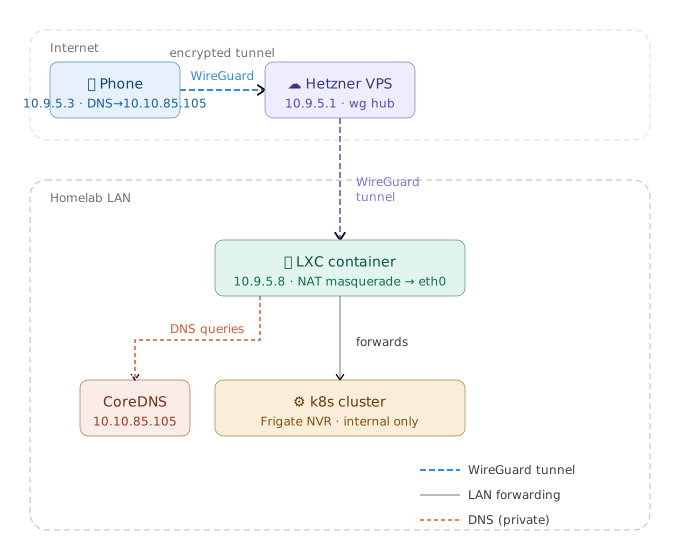
I don’t want to expose frigate’s UI to the internet since it’s not password protected so I’m going to create a VPN route that connects my mobile phone to my hetzner instance who then masquerades my request to an LXC container running in my homelab who will then forward the requests to my k8s cluster. The DNS should also be kept private so I’ll access my coredns’ records from the tunnel as well.
This is my mobile phone’s configuration:
1
2
3
4
5
6
7
8
9
10
11
12
[Interface]
Address = 10.9.5.3/32
ListenPort = 38985
PrivateKey = PrivateKey
DNS = 10.10.85.2

[Peer]
PublicKey = PublicKey
PresharedKey = PresharedKey
AllowedIPs = 10.9.5.1/32, 10.10.85.0/24
Endpoint = myserver.example.com:8989
PersistentKeepalive = 25
The hetzner server would look like this:
1
2
3
4
5
6
7
8
9
10
11
12
13
14
15
16
17
18
19
20
21
22
23
24
25
26
27
[Interface]
Address = 10.9.5.1/24
ListenPort = 8989
PrivateKey = PrivateKey

# packet forwarding
PreUp = sysctl -w net.ipv4.ip_forward=1

# Allow forwarding between peers on wg1
PostUp = iptables -A FORWARD -i wg1 -o wg1 -j ACCEPT
PostUp = iptables -A FORWARD -i wg1 -o wg1 -m state --state ESTABLISHED,RELATED -j ACCEPT

# Remove the rules when interface goes down
PostDown = iptables -D FORWARD -i wg1 -o wg1 -j ACCEPT
PostDown = iptables -D FORWARD -i wg1 -o wg1 -m state --state ESTABLISHED,RELATED -j ACCEPT

[Peer]
PublicKey = PublicKey
PresharedKey = PresharedKey
AllowedIPs = 10.9.5.8/32,10.10.85.0/24
PersistentKeepalive = 25

[Peer]
PublicKey = PublicKey
PresharedKey = PresharedKey
AllowedIPs = 10.9.5.3/32
PersistentKeepalive = 25
And the LXC container would look like this:
1
2
3
4
5
6
7
8
9
10
11
12
13
14
15
16
17
18
[Interface]
Address = 10.9.5.8/32
ListenPort = 38987
PrivateKey = PrivateKey

# packet forwarding
PreUp = sysctl -w net.ipv4.ip_forward=1

# masquerade to eth0
PostUp = iptables -A FORWARD -i wg1 -j ACCEPT; iptables -t nat -A POSTROUTING -o eth0 -j MASQUERADE
PostDown = iptables -D FORWARD -i wg1 -j ACCEPT; iptables -t nat -D POSTROUTING -o eth0 -j MASQUERADE

[Peer]
PublicKey = PublicKey
PresharedKey = PresharedKey
AllowedIPs = 10.9.5.1/32, 10.9.5.3/32
Endpoint = myserver.example.com:8989
PersistentKeepalive = 25
I’ve learned how to setup this network with this great resource so if you’re ever interested in networking this is one is a must.
The result
Looking good:
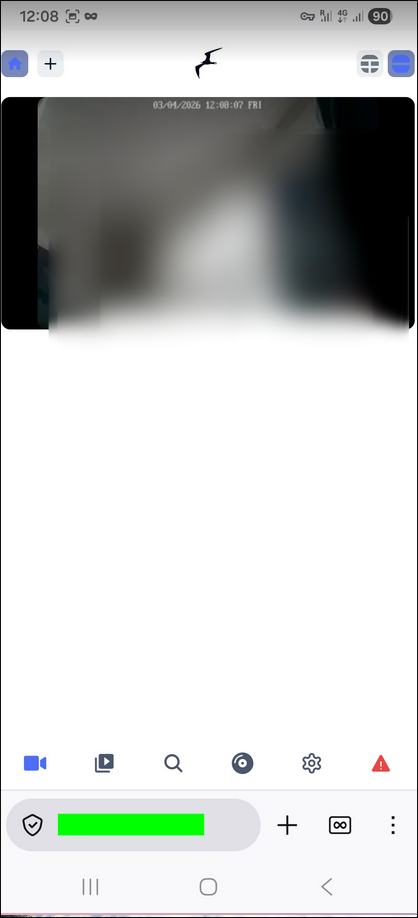
Frigate is still complaining about the cpu usage being at 53% but I don’t see any frame drops or problems in the recording or detection so I’ll just be happy with the result for now and call it a day.