
Introduction
It’s been a while ! Vacations are great for recharging but they also have a major impact on one’s writing routine. Let’s see if I can pick up the enthusiasm for writing and sharing what I’ve been up to.
I’ll be talking about k8s today for a change and sharing what I’ve learned after rebuilding my cluster from scratch multiple times. It all started with a VM in our cloud environment which I wanted to get access to. That VM however had no guest agent tools running on it so I wouldn’t be able to trigger the cloud-init functionality to reset the password so I did what any responsible IT person would do and I would ask an LLM for help ^^ The machine however was provisioned with Fedora CoreOS (FCOS) which, if you don’t know, is a read only file system that is geared at security conscious people that want a lean, reproducible, container friendly distribution. You can try booting the partition and messing with the passwords, with the ssh authorized key file or interrupt the boot sequence but nothing would work. It’s as if the machine started off a clean slate every single time. I realized there had to be another way and simply started my own instance with the ignition script that would configure my machine, inject ssh keys, etc and pointed it to a snapshot of the original machine which worked out in the end.
The encounter with this new distribution left me wondering in the end: are there any advantages to running this? Who can benefit from such a distro? And it turns out there are some solid reasons as to why you should consider FCOS.
- It’s a lean distro that only ships the bare minimum for you to run containers which reduces your attack surface and reduces deployment times.
- It severely impairs both physical and remote attacks. The classic mount and grant yourself access is out of the equation. The ignition script on boot will just ignore any manual changes. If by any chance an unauthorized user gets access to the VM it won’t be able to do much since everything is locked down. There is no installed package manager and no way to start a malicious systemd service even if you’re root. I’m not even sure you can mess with the system even if secure boot is disabled. I’d have to test that out and edit this part one day.
- It’s immutable and declarative. You don’t have to worry about anything else running on the VM. The image is baked once and applied during provisioning which means that there is 0 drift between your instance and the configuration file. A general purpose OS would have granted more flexibility but it would allow users to create systemd units or bash scripts that would probably get forgotten if the machine would need to get retired one day.
- The OS itself does atomic updates so you can roll it back in case anything goes wrong
The shiny object
So I was sold on the idea of using this new distribution for a layer 1 kubernetes hypervisor. Since I’ll be rebuilding the cluster anyways, might as well use this new shiny CNI plugin everyone seems to be talking about: cilium. I had been running flannel as my default overlay since the beginning and saw no reason to change because I didn’t need network policies.
I later realized that cilium brings a lot more than just policies. It taps into the kernel to apply the routing so it’s faster than iptables flannel. Considering I’m using vintage hardware I can’t afford to bottleneck my network just because flannel wants to go through all my routes sequentially. I’m already pushing it to the limit by using replication and ceph so I can’t have my cluster run slow just because I chose the wrong plugin. If that wasn’t enough, cilium also brings baked in observability and L7 application security which means that you can see the packets flowing from pod to pod and apply policies on DNS if I wanted to.
How it works
Both iptables and eBPF run in the kernel context, but with kube proxy + iptables you’d have context switches between userspace and kernel. In plain english, this means that there is a lot more back and forth needed for k8s to know where it should route its packets. With cilium you’re writing policies for the BPF virtual machine which translates them into byte code who then loads them into the kernel saving you the trip back and forth to the kube-proxy.
The k8s cluster will be running as 3 VPS on the hetzner cloud so there is a L3 vSwitch between those virtual machines and no L2 connectivity so we will have to sacrifice 50 bytes for us to apply the “tunnel” routing mode with cilium. We could push that MTU much higher if we had the appropriate switches and bare metal machines but this is a proof of concept so we won’t be doing that just now.
So let’s try to imagine that cilium is running in our cluster. How would the routing look like?
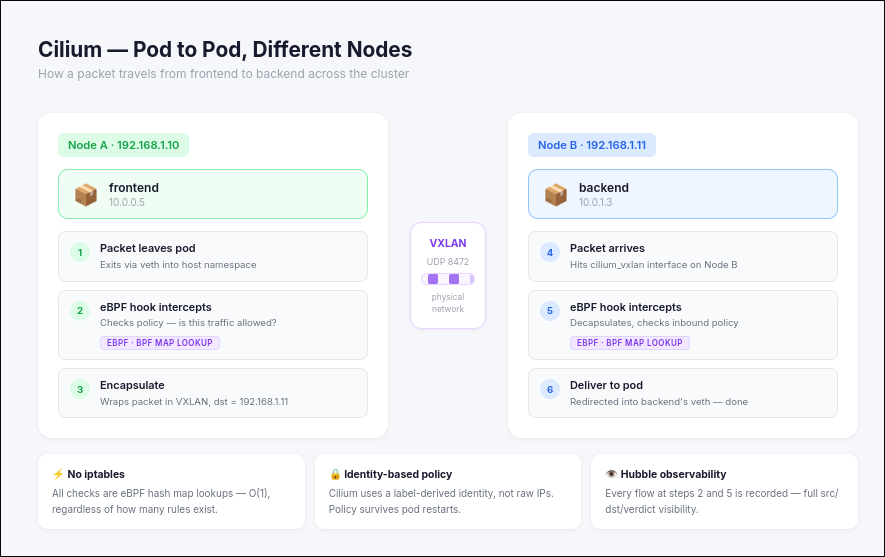
In the use case above Pod 1 on the left is on a different node than the Pod 2. The Pod was created by the kubelet which triggered linux to create a veth network which is basically a virtual bridge that the pod can use to communicate with the host. At this point the kubeproxy would take over in our previous setup to route the request but since we’re using cilium we’ll ditch kube proxy and go through eBPF instead. The cilium agent then creates a “bpf program” that will be mounted into the /sys/fs/bpf to make sure it’s saved into the kernel and persists even if cilium is down. To put it very simply: a bpf program is the policy that specifies permissions and masquerades services with a destination NAT for example.
Once the hook is triggered and the packet needs to go to another node then it gets encapsulated and sent out via the physical NIC to Node B. If it’s in the same node then it just gets redirected straight into backend’s veth without VXLAN encapsulation.
Bootstraping the new system
In order for cilium to orchestrate this system it needs a daemon set agent that runs on all nodes and a service discovery which run from both “/etc/cni/net.d” and “/opt/cni/bin”. These directories don’t exist in FCOS so they need to be provisioned before deploying FCOS.
I’ll be using terraform to provision those FCOS VMs.
1. Running it on hetzner
Hetzner doesn’t provide a template for FCOS so you have two choices. You can either A. upload the image manually B. use a bash script to create the image or C. use the hcloud-upload-image utility from github. I’m not doing the option A since I want to have something reproducible. Furthermore, if I ever want to upgrade versions I’ll probably forget something and waste time rebuilding the image so might as well do it right on the first run
Option B would look something like this:
As a side note, make sure to use the architectures.x86_64.artifacts.openstack instead of the architectures.x86_64.artifacts.qemu one as it’s not compatible with hetzner for some reason
1
2
3
4
5
6
7
8
9
10
11
12
13
14
15
16
17
18
19
20
21
22
23
24
25
26
27
28
29
30
31
32
33
34
35
36
37
38
39
40
41
42
43
44
45
46
47
48
49
50
51
52
53
54
55
56
57
58
59
60
61
62
63
64
65
66
67
68
69
70
71
72
73
74
75
76
77
78
79
80
81
82
83
84
85
86
87
88
89
90
91
92
93
94
95
96
97
98
99
100
101
102
103
104
105
106
107
108
109
110
111
112
113
114
115
116
117
118
119
120
121
122
123
124
125
126
127
128
129
130
131
132
133
134
135
136
137
138
139
140
141
142
143
144
145
146
147
148
149
150
151
152
153
154
155
156
157
158
159
160
161
162
163
164
165
166
167
168
169
170
171
172
173
174
175
176
177
178
179
180
181
182
183
184
185
186
187
188
189
190
191
192
193
194
195
196
197
198
199
200
201
202
203
204
205
206
207
208
209
210
211
212
#!/bin/bash
set -euo pipefail

# Script to upload Fedora CoreOS to Hetzner Cloud as a snapshot

# Usage: ./upload-fcos-to-hetzner.sh [ssh-private-key-path]
SSH_KEY_PATH="${1:-$HOME/.ssh/id_ed25519}"

echo "=== Fedora CoreOS Hetzner Upload Script ==="
echo "Using SSH key: $SSH_KEY_PATH"
echo ""

# Verify SSH key exists
if [ ! -f "$SSH_KEY_PATH" ]; then
    echo "Error: SSH key not found at $SSH_KEY_PATH"
    echo "Usage: $0 [ssh-private-key-path]"
    echo "Example: $0 ~/.ssh/id_ed25519"
    exit 1
fi

# Check for required tools
if ! command -v hcloud &> /dev/null; then
    echo "Error: hcloud CLI not found. Install it:"
    echo "  brew install hcloud (macOS)"
    echo "  wget -O /usr/local/bin/hcloud https://github.com/hetznercloud/cli/releases/latest/download/hcloud-linux-amd64"
    exit 1
fi

if ! command -v jq &> /dev/null; then
    echo "Error: jq not found. Install it:"
    echo "  apt-get install jq (Ubuntu/Debian)"
    echo "  brew install jq (macOS)"
    exit 1
fi

# Check for API token
if [ -z "${HCLOUD_TOKEN:-}" ]; then
    echo "Error: HCLOUD_TOKEN environment variable not set"
    echo "Export your Hetzner Cloud API token:"
    echo "  export HCLOUD_TOKEN='your-token-here'"
    exit 1
fi

echo "Step 1: Downloading latest Fedora CoreOS qcow2 image..."
STREAM="stable"
ARCH="x86_64"

# Get the latest version info
FCOS_INFO=$(curl -s "https://builds.coreos.fedoraproject.org/streams/${STREAM}.json")
VERSION=$(echo "$FCOS_INFO" | jq -r '.architectures.x86_64.artifacts.qemu.release')
QCOW_URL=$(echo "$FCOS_INFO" | jq -r '.architectures.x86_64.artifacts.openstack.formats."qcow2.xz".disk.location')

echo "Latest version: $VERSION"
echo "Download URL: $QCOW_URL"

FILENAME="fedora-coreos-${VERSION}-qemu.x86_64.qcow2.xz"

if [ ! -f "$FILENAME" ]; then
    echo "Downloading $FILENAME..."
    curl -L -o "$FILENAME" "$QCOW_URL"
else
    echo "File already exists: $FILENAME"
fi

echo ""
echo "Step 2: Decompressing image..."
QCOW_FILE="${FILENAME%.xz}"
if [ ! -f "$QCOW_FILE" ]; then
    xz -d -k "$FILENAME"
else
    echo "Decompressed file already exists: $QCOW_FILE"
fi

echo ""
echo "Step 3: Creating temporary server for snapshot upload..."

# Your ssh key's ID you find from running hcloud ssh-key list
SSH_KEY_ID=100614144

if [ -z "$SSH_KEY_ID" ]; then
    echo "Error: No SSH keys found in your Hetzner account"
    echo "Add one with: hcloud ssh-key create --name mykey --public-key \"$(cat ${SSH_KEY_PATH}.pub)\""
    exit 1
fi

echo "Using SSH key ID: $SSH_KEY_ID"

# Create a temporary server
SERVER_NAME="fcos-upload-temp-$$"
echo "Creating server: $SERVER_NAME"

hcloud server create \
    --name "$SERVER_NAME" \
    --type cx23 \
    --image ubuntu-22.04 \
    --ssh-key "$SSH_KEY_ID" \
    --location nbg1

# Wait for it to be fully created
echo "Waiting for server to be created..."
sleep 10

# Get server ID and IP using columns output
SERVER_ID=$(hcloud server list -o columns=id,name -o noheader | grep "$SERVER_NAME" | awk '{print $1}')
SERVER_IP=$(hcloud server list -o columns=name,ipv4 -o noheader | grep "$SERVER_NAME" | awk '{print $2}')

if [ -z "$SERVER_ID" ]; then
    echo "Error: Could not find server ID"
    exit 1
fi

if [ -z "$SERVER_IP" ]; then
    echo "Error: Could not find server IP"
    exit 1
fi

echo "Server created with ID: $SERVER_ID"
echo "Server IP: $SERVER_IP"

echo "Waiting for server to boot and SSH to be ready (60 seconds)..."
sleep 60

echo ""
echo "Step 4: Uploading and converting image..."
echo "This may take several minutes..."

# Add SSH key to known_hosts
ssh-keyscan -H "$SERVER_IP" >> ~/.ssh/known_hosts 2>/dev/null || true

# Upload the image
echo "Uploading image to server (this will take a while)..."
scp -i "$SSH_KEY_PATH" -o StrictHostKeyChecking=no "$QCOW_FILE" "root@${SERVER_IP}:/tmp/" || {
    echo "Error: Failed to upload image"
    echo "Trying to connect with SSH to debug..."
    ssh -i "$SSH_KEY_PATH" -o StrictHostKeyChecking=no "root@${SERVER_IP}" echo "SSH connection successful" || {
        echo "SSH connection failed. Server might not be ready yet."
        echo "You can try manually:"
        echo "  ssh -i $SSH_KEY_PATH root@$SERVER_IP"
        echo "Then run these commands:"
        echo "  apt-get update && apt-get install -y qemu-utils"
        echo "  # Upload the file manually and convert it"
        echo ""
        echo "Don't forget to delete the server when done:"
        echo "  hcloud server delete $SERVER_ID"
        exit 1
    }
    exit 1
}

# Convert and write to disk
echo "Converting and writing image to disk..."
# you can overwrite the current rootfs because the OS is loaded into RAM
ssh -i "$SSH_KEY_PATH" -o StrictHostKeyChecking=no "root@${SERVER_IP}" << 'EOF'
    echo "Installing qemu-utils..."
    apt-get update -qq && apt-get install -y -qq qemu-utils

    echo "Converting image to raw format and writing to disk..."
    qemu-img convert -f qcow2 -O raw /tmp/*.qcow2 /dev/sda

    echo "Syncing filesystem..."
    sync

    echo "Done!"
EOF

echo ""
echo "Step 5: Creating snapshot..."
echo "Shutting down server..."
hcloud server shutdown "$SERVER_ID"

# Wait for shutdown
echo "Waiting for shutdown to complete..."
sleep 20

echo "Creating snapshot..."
SNAPSHOT_DESC="Fedora CoreOS $VERSION"
hcloud server create-image \
    --description "$SNAPSHOT_DESC" \
    --type snapshot \
    "$SERVER_ID"

# Wait for snapshot creation
sleep 10

# Get snapshot ID
SNAPSHOT_ID=$(hcloud image list -o columns=id,description -o noheader | grep "Fedora CoreOS" | tail -1 | awk '{print $1}')

echo ""
echo "Step 6: Cleaning up..."
hcloud server delete "$SERVER_ID"

echo ""
echo "=== Done! ==="
echo ""

if [ -n "$SNAPSHOT_ID" ]; then
    echo "Snapshot created successfully!"
    echo "Snapshot ID: $SNAPSHOT_ID"
    echo ""
    echo "Add this to your terraform.tfvars:"
    echo "fcos_image_id = \"$SNAPSHOT_ID\""
else
    echo "Snapshot created but ID could not be determined automatically."
    echo "Run: hcloud image list"
    echo "Look for: $SNAPSHOT_DESC"
    echo "Then add the ID to terraform.tfvars"
fi

echo ""
echo "To verify: hcloud image list"
hcloud image list --type snapshot
Option C is actually the one I recommend since it’s a plug and play solution which will probably be kept up to date with hetzner
1
2
3
4
5
6
7
8
9
10
11
12
13
14
15
16
17
18
# download the cloud image of coreos first
# https://fedoraproject.org/coreos/download/?stream=stable#arches


IMAGE_NAME="fedora-coreos-41.20250213.0-hetzner.x86_64.raw.xz"
ARCH="x86_64"    # or "aarch64"
STREAM="stable"  # or "testing", "next"
export HCLOUD_TOKEN="<your token>"

hcloud-upload-image upload \
  --architecture "x86" \
  --compression xz \
  --image-path "$IMAGE_NAME" \
  --location fsn1 \
  --labels os=fedora-coreos,channel="$STREAM" \
  --description "Fedora CoreOS ($STREAM, $ARCH)"

hcloud image list --type=snapshot --selector=os=fedora-coreos
2. The butane and ignition script
At this point we have an image at our disposal so in order to configure it I’ll have to create a butane yaml. There is a more modern version of butane called ignition but it’s not as human readable as the butane one and can lead to errors since the ignition configuration is a json file.
I’ve written this bash script to create the butane file first and derive the ignition file from the butane one so that I get the best of both worlds. It also includes a couple of tweaks that allow pods to mount certain directories and allow cilium to write and persist data to the filesystem
1
2
3
4
5
6
7
8
9
10
11
12
13
14
15
16
17
18
19
20
21
22
23
24
25
26
27
28
29
30
31
32
33
34
35
36
37
38
39
40
41
42
43
44
45
46
47
48
49
50
51
52
53
54
55
56
57
58
59
60
61
62
63
64
65
66
67
68
69
70
71
72
73
74
75
76
77
78
79
80
81
82
83
84
85
86
87
88
89
90
91
92
93
94
95
96
97
98
99
100
101
102
103
104
105
106
107
108
109
110
111
112
113
114
115
116
117
118
119
120
121
122
123
124
125
126
127
128
129
130
131
132
133
134
135
136
137
138
139
140
141
142
143
144
145
146
147
148
149
150
151
152
153
154
155
156
157
158
159
160
161
162
163
164
165
166
167
168
169
170
171
172
173
174
175
176
177
178
179
180
181
182
183
184
185
186
187
188
189
190
191
192
193
194
195
196
197
198
199
200
201
202
203
204
205
206
207
208
209
210
211
212
213
214
215
216
217
218
219
220
221
222
223
224
225
226
227
228
229
230
231
232
233
234
235
236
237
238
239
240
241
242
243
244
245
246
247
248
249
250
251
252
253
254
255
256
257
258
259
260
261
262
263
264
265
266
267
268
269
270
271
272
273
274
275
276
277
278
279
280
281
282
283
284
285
286
287
288
289
290
291
292
293
294
295
296
297
298
299
300
301
302
303
304
305
306
307
308
309
310
311
312
313
314
315
316
317
318
319
320
321
322
323
324
325
326
327
328
329
330
331
332
333
334
335
336
337
338
339
340
341
342
343
344
345
346
347
348
349
350
351
352
353
354
355
356
357
358
359
360
361
362
363
364
365
366
367
368
369
370
371
372
373
374
375
376
377
378
379
380
381
382
383
384
385
386
387
388
389
390
391
392
393
394
395
396
397
398
399
400
401
402
403
404
405
406
407
408
409
410
411
412
413
414
415
416
417
418
419
420
421
422
423
424
425
426
427
428
429
430
431
432
433
434
435
436
437
438
439
440
441
442
443
444
445
446
447
448
449
450
451
452
453
454
455
456
457
458
459
460
461
462
463
464
465
466
467
468
469
470
471
472
473
474
475
476
477
478
479
480
481
482
483
484
485
486
487
488
489
490
491
492
493
494
495
496
497
498
499
500
501
502
503
504
505
506
507
508
509
510
511
512
513
514
515
516
517
518
519
520
521
522
523
524
525
526
527
528
529
530
531
532
533
534
535
536
537
538
539
540
541
542
543
544
545
546
547
548
549
550
551
552
553
554
555
556
557
558
559
560
561
562
563
564
565
566
567
568
569
570
571
572
573
574
575
576
577
578
579
580
581
582
583
584
585
586
587
588
589
590
591
592
593
594
595
596
597
598
599
600
601
602
603
604
605
606
607
608
609
610
611
612
613
614
615
616
617
618
619
620
621
622
623
624
625
626
627
628
629
630
631
632
633
634
635
636
637
638
639
640
641
642
643
644
645
646
647
648
649
650
651
652
653
654
655
656
657
658
659
660
661
662
663
664
665
666
667
668
669
670
671
672
673
674
675
676
677
678
679
680
681
682
683
684
685
686
687
688
689
690
691
692
693
694
695
696
697
698
699
700
701
702
703
704
705
706
707
708
709
710
711
712
713
714
715
716
717
718
719
720
721
722
723
724
725
726
727
728
729
730

#!/bin/bash
set -euo pipefail

# Default configuration
NUM_NODES=3
SSH_KEY="ssh-ed25519 AAAAAAAAAAAAAAAAAAAAAAAAAAAAAAAAAAAAAAAAAAAAAAAA yourname@youremail"
BASE_IP="10.0.1"
STARTING_IP=10
INTERFACE_NAME="ens10"
HOSTNAME_PREFIX="fedora-coreos-node"
CONTAINER_RUNTIME="containerd"  # containerd or crio
SELINUX_MODE="permissive"       # enforcing, permissive, or disabled

# Colors
RED='\033[0;31m'
GREEN='\033[0;32m'
YELLOW='\033[1;33m'
BLUE='\033[0;34m'
NC='\033[0m' # No Color

# Load config file if exists
CONFIG_FILE="butane-config.env"
if [ -f "$CONFIG_FILE" ]; then
    echo -e "${GREEN}Loading configuration from ${CONFIG_FILE}${NC}"
    source "$CONFIG_FILE"
fi

# Help function
show_help() {
    cat << EOF
Usage: $0 [OPTIONS]

Generate Butane configuration files and Ignition JSON for Fedora CoreOS nodes
optimized for Kubernetes with Cilium CNI and Kubespray deployment.

Options:
    -n, --nodes NUM         Number of nodes to generate (default: 3)
    -k, --ssh-key KEY       SSH public key to use
    -i, --interface NAME    Network interface name (default: ens10)
    -b, --base-ip IP        Base IP address (default: 10.0.1)
    -s, --start-ip NUM      Starting IP suffix (default: 10)
    -p, --prefix PREFIX     Hostname prefix (default: fedora-coreos-node)
    -r, --runtime RUNTIME   Container runtime: containerd or crio (default: containerd)
    -e, --selinux MODE      SELinux mode: enforcing, permissive, disabled (default: permissive)
    -c, --clean             Clean existing files before generating
    -h, --help              Show this help message

Examples:
    $0                                      # Generate 3 nodes with defaults
    $0 -n 5                                 # Generate 5 nodes
    $0 -n 3 -i eth1 -b 192.168.1 -s 100   # Custom network settings
    $0 --clean -n 3                         # Clean and regenerate
    $0 -r crio -e enforcing                # Use CRI-O with SELinux enforcing

Configuration file:
    Create ${CONFIG_FILE} with variables to override defaults:

    NUM_NODES=3
    SSH_KEY="ssh-ed25519 AAAA..."
    BASE_IP="10.0.1"
    STARTING_IP=10
    INTERFACE_NAME="ens10"
    HOSTNAME_PREFIX="fedora-coreos-node"
    CONTAINER_RUNTIME="containerd"
    SELINUX_MODE="permissive"

Features:
    - Kubernetes-ready configuration with required kernel modules
    - Cilium CNI support with eBPF optimization
    - Kubespray-compatible setup
    - Automatic Python3 installation for Ansible
    - Network configuration with static IPs
    - Swap disabled (Kubernetes requirement)
    - Required sysctl parameters configured
    - Container runtime support (containerd/CRI-O)

EOF
}

# Parse command line arguments
CLEAN=false
while [[ $# -gt 0 ]]; do
    case $1 in
        -n|--nodes)
            NUM_NODES="$2"
            shift 2
            ;;
        -k|--ssh-key)
            SSH_KEY="$2"
            shift 2
            ;;
        -i|--interface)
            INTERFACE_NAME="$2"
            shift 2
            ;;
        -b|--base-ip)
            BASE_IP="$2"
            shift 2
            ;;
        -s|--start-ip)
            STARTING_IP="$2"
            shift 2
            ;;
        -p|--prefix)
            HOSTNAME_PREFIX="$2"
            shift 2
            ;;
        -r|--runtime)
            CONTAINER_RUNTIME="$2"
            if [[ ! "$CONTAINER_RUNTIME" =~ ^(containerd|crio)$ ]]; then
                echo -e "${RED}Error: Runtime must be 'containerd' or 'crio'${NC}"
                exit 1
            fi
            shift 2
            ;;
        -e|--selinux)
            SELINUX_MODE="$2"
            if [[ ! "$SELINUX_MODE" =~ ^(enforcing|permissive|disabled)$ ]]; then
                echo -e "${RED}Error: SELinux mode must be 'enforcing', 'permissive', or 'disabled'${NC}"
                exit 1
            fi
            shift 2
            ;;
        -c|--clean)
            CLEAN=true
            shift
            ;;
        -h|--help)
            show_help
            exit 0
            ;;
        *)
            echo -e "${RED}Unknown option: $1${NC}"
            show_help
            exit 1
            ;;
    esac
done

# Clean existing files if requested
if [ "$CLEAN" = true ]; then
    echo -e "${YELLOW}Cleaning existing Butane and Ignition files...${NC}"
    rm -f node-*.bu ignition-node-*.json
    echo -e "${GREEN}✓ Cleaned${NC}"
    echo ""
fi

# Check if butane is installed
if ! command -v butane &> /dev/null; then
    echo -e "${RED}Error: butane command not found${NC}"
    echo "Please install butane first:"
    echo "  Fedora/RHEL: sudo dnf install butane"
    echo "  Other: https://github.com/coreos/butane/releases"
    exit 1
fi

# Function to generate Butane config for a node
generate_butane_config() {
    local node_num=$1
    local hostname="${HOSTNAME_PREFIX}-${node_num}"
    local ip_suffix=$((STARTING_IP + node_num - 1))
    local private_ip="${BASE_IP}.${ip_suffix}"
    local output_file="node-${node_num}.bu"

    cat > "${output_file}" <<EOF
variant: fcos
version: 1.5.0

passwd:
  users:
    - name: core
      ssh_authorized_keys:
        - ${SSH_KEY}
      groups:
        - wheel
        - sudo

storage:
  directories:
    # Kubernetes directories
    - path: /etc/kubernetes
      mode: 0755
    - path: /var/lib/kubelet
      mode: 0755
    - path: /var/lib/etcd
      mode: 0700
    # Cilium directories
    - path: /etc/cilium
      mode: 0755
    - path: /var/lib/cilium
      mode: 0755
    # CNI directories (in /var since /opt is read-only)
    # Note: /run is a tmpfs, directories created at runtime by services
$(if [ "$CONTAINER_RUNTIME" = "containerd" ]; then
cat <<'CONTAINERD_DIRS'
    # Containerd directories
    - path: /etc/containerd
      mode: 0755
    - path: /etc/containerd/config.d
      mode: 0755
    - path: /var/lib/containerd
      mode: 0755
CONTAINERD_DIRS
else
cat <<'CRIO_DIRS'
    # CRI-O directories
    - path: /etc/crio
      mode: 0755
    - path: /etc/crio/crio.conf.d
      mode: 0755
    - path: /var/lib/crio
      mode: 0755
CRIO_DIRS
fi)
    # cilium
    - path: /etc/cni/net.d
      mode: 0755
      user:
        id: 0
      group:
        id: 0
    - path: /opt/cni/bin
      mode: 0755
      user:
        id: 0
      group:
        id: 0

  files:
    # Hostname configuration
    - path: /etc/hostname
      mode: 0644
      overwrite: true
      contents:
        inline: ${hostname}

    # Network configuration
    - path: /etc/NetworkManager/system-connections/private.nmconnection
      mode: 0600
      contents:
        inline: |
          [connection]
          id=private
          type=ethernet
          interface-name=${INTERFACE_NAME}

          [ethernet]

          [ipv4]
          method=manual
          addresses=${private_ip}/24

          [ipv6]
          method=disabled

    # Kernel modules for Cilium and Kubernetes
    - path: /etc/modules-load.d/k8s-cilium.conf
      mode: 0644
      contents:
        inline: |
          # Required for Kubernetes
          overlay
          br_netfilter

          # Required for Cilium eBPF
          sch_ingress
          sch_cls

          # Required for kube-proxy (if using iptables mode)
          ip_vs
          ip_vs_rr
          ip_vs_wrr
          ip_vs_sh
          nf_conntrack

          # Additional networking modules
          xt_socket
          xt_u32
          vxlan

    # Sysctl parameters for Kubernetes and Cilium
    - path: /etc/sysctl.d/99-kubernetes-cilium.conf
      mode: 0644
      contents:
        inline: |
          # Kubernetes networking
          net.bridge.bridge-nf-call-iptables = 1
          net.bridge.bridge-nf-call-ip6tables = 1
          net.ipv4.ip_forward = 1
          net.ipv4.conf.all.forwarding = 1
          net.ipv6.conf.all.forwarding = 1

          # Allow Cilium to manage these - don't set strict values
          net.ipv4.conf.default.rp_filter = 0
          net.ipv4.conf.all.rp_filter = 0

          # Disable IPv6 router advertisements (optional, can be removed if using IPv6)
          net.ipv6.conf.all.accept_ra = 0
          net.ipv6.conf.default.accept_ra = 0

          # eBPF and performance tuning
          net.core.bpf_jit_enable = 1
          net.core.bpf_jit_harden = 0
          net.core.bpf_jit_limit = 1000000000

          # Increase connection tracking (important for Cilium)
          net.netfilter.nf_conntrack_max = 1000000
          net.netfilter.nf_conntrack_tcp_timeout_established = 86400
          net.netfilter.nf_conntrack_tcp_timeout_close_wait = 3600

          # ARP settings for Cilium
          net.ipv4.neigh.default.gc_thresh1 = 80000
          net.ipv4.neigh.default.gc_thresh2 = 90000
          net.ipv4.neigh.default.gc_thresh3 = 100000

          # File system tuning for Kubernetes
          fs.inotify.max_user_watches = 524288
          fs.inotify.max_user_instances = 512
          fs.file-max = 2097152

          # Kernel tuning
          kernel.pid_max = 4194304
          vm.max_map_count = 262144

          # Disable swap usage (important!)
          vm.swappiness = 0

          # Cilium-specific: allow unprivileged BPF
          kernel.unprivileged_bpf_disabled = 0

    # Silence audit logs (optional, reduces log spam)
    - path: /etc/sysctl.d/20-silence-audit.conf
      mode: 0644
      contents:
        inline: |
          # Disable audit system
          kernel.printk = 4 4 1 7

    # SELinux configuration
    - path: /etc/selinux/config
      mode: 0644
      overwrite: true
      contents:
        inline: |
          SELINUX=${SELINUX_MODE}
          SELINUXTYPE=targeted

    # Hosts file with all cluster nodes
    - path: /etc/hosts
      mode: 0644
      overwrite: true
      contents:
        inline: |
          127.0.0.1   localhost localhost.localdomain localhost4 localhost4.localdomain4
          ::1         localhost localhost.localdomain localhost6 localhost6.localdomain6

          # Cluster nodes
$(for i in $(seq 1 $NUM_NODES); do
    node_ip="${BASE_IP}.$((STARTING_IP + i - 1))"
    node_name="${HOSTNAME_PREFIX}-${i}"
    echo "          ${node_ip}   ${node_name}"
done)

    # Containerd configuration drop-ins (if using containerd)
$(if [ "$CONTAINER_RUNTIME" = "containerd" ]; then
cat <<'CONTAINERD_CONFIG'
    - path: /etc/containerd/config.d/10-kubernetes.toml
      mode: 0644
      contents:
        inline: |
          version = 2

          [plugins."io.containerd.grpc.v1.cri"]
            sandbox_image = "registry.k8s.io/pause:3.9"

            [plugins."io.containerd.grpc.v1.cri".containerd]
              [plugins."io.containerd.grpc.v1.cri".containerd.runtimes.runc]
                runtime_type = "io.containerd.runc.v2"
                [plugins."io.containerd.grpc.v1.cri".containerd.runtimes.runc.options]
                  SystemdCgroup = true

            [plugins."io.containerd.grpc.v1.cri".cni]
              bin_dir = "/opt/cni/bin"
              conf_dir = "/etc/cni/net.d"
CONTAINERD_CONFIG
fi)

    # CRI-O configuration (if using crio)
$(if [ "$CONTAINER_RUNTIME" = "crio" ]; then
cat <<'CRIO_CONFIG'
    - path: /etc/crio/crio.conf.d/02-cgroup-manager.conf
      mode: 0644
      contents:
        inline: |
          [crio.runtime]
          conmon_cgroup = "pod"
          cgroup_manager = "systemd"

    - path: /etc/crio/crio.conf.d/03-cni.conf
      mode: 0644
      contents:
        inline: |
          [crio.network]
          network_dir = "/etc/cni/net.d/"
          plugin_dirs = ["/opt/cni/bin/"]
CRIO_CONFIG
fi)

systemd:
  units:
    # Network manager wait for online
    - name: NetworkManager-wait-online.service
      enabled: true

    # Disable swap (required for Kubernetes)
    - name: disable-swap.service
      enabled: true
      contents: |
        [Unit]
        Description=Disable Swap for Kubernetes
        DefaultDependencies=no
        Before=kubelet.service

        [Service]
        Type=oneshot
        ExecStart=/usr/sbin/swapoff -a
        ExecStart=/usr/bin/sh -c 'sed -i.bak "/ swap / s/^/#/" /etc/fstab || true'
        RemainAfterExit=yes

        [Install]
        WantedBy=multi-user.target

    # Create runtime directories for Cilium
    - name: create-cilium-runtime-dirs.service
      enabled: true
      contents: |
        [Unit]
        Description=Create Cilium Runtime Directories
        DefaultDependencies=no
        Before=kubelet.service containerd.service crio.service

        [Service]
        Type=oneshot
        ExecStart=/usr/bin/mkdir -p /run/cilium
        ExecStart=/usr/bin/chmod 0755 /run/cilium
        RemainAfterExit=yes

        [Install]
        WantedBy=multi-user.target

    # Mount BPF filesystem for Cilium
    - name: sys-fs-bpf.mount
      enabled: true
      contents: |
        [Unit]
        Description=BPF Filesystem for Cilium
        Documentation=https://docs.cilium.io/
        DefaultDependencies=no
        Before=kubelet.service
        ConditionPathIsMountPoint=!/sys/fs/bpf

        [Mount]
        What=bpffs
        Where=/sys/fs/bpf
        Type=bpf
        Options=rw,nosuid,nodev,noexec,relatime,mode=700

        [Install]
        WantedBy=multi-user.target

    # Load kernel modules
    - name: load-kernel-modules.service
      enabled: true
      contents: |
        [Unit]
        Description=Load Kernel Modules for Kubernetes and Cilium
        DefaultDependencies=no
        Before=kubelet.service
        After=systemd-modules-load.service

        [Service]
        Type=oneshot
        ExecStart=/usr/sbin/modprobe overlay
        ExecStart=/usr/sbin/modprobe br_netfilter
        ExecStart=/usr/sbin/modprobe sch_ingress
        ExecStart=/usr/sbin/modprobe sch_cls
        ExecStart=/usr/sbin/modprobe ip_vs
        ExecStart=/usr/sbin/modprobe ip_vs_rr
        ExecStart=/usr/sbin/modprobe ip_vs_wrr
        ExecStart=/usr/sbin/modprobe ip_vs_sh
        ExecStart=/usr/sbin/modprobe nf_conntrack
        ExecStart=/usr/sbin/modprobe xt_socket
        ExecStart=/usr/sbin/modprobe xt_u32
        ExecStart=/usr/sbin/modprobe vxlan
        RemainAfterExit=yes

        [Install]
        WantedBy=multi-user.target

    # Apply sysctl settings
    - name: apply-sysctl.service
      enabled: true
      contents: |
        [Unit]
        Description=Apply Sysctl Settings
        After=network.target

        [Service]
        Type=oneshot
        ExecStart=/usr/sbin/sysctl --system
        RemainAfterExit=yes

        [Install]
        WantedBy=multi-user.target

    - name: install-packages.service
      enabled: true
      contents: |
        [Unit]
        Description=Install Required Packages for Kubernetes and Ansible
        After=network-online.target
        Wants=network-online.target
        Before=node-setup.service
        ConditionPathExists=!/var/lib/kubernetes-packages-installed

        [Service]
        Type=oneshot
        ExecStart=/usr/bin/rpm-ostree install --apply-live --allow-inactive \\
          python3 \\
          python3-libselinux \\
          python3-pip \\
          python3-pyyaml \\
          helm \\
          socat \\
          conntrack-tools \\
          ipset \\
          iptables \\
          ebtables \\
          ethtool \\
          ipvsadm \\
          bash-completion \\
          curl \\
          wget \\
          tar \\
          rsync
        ExecStart=/usr/bin/touch /var/lib/kubernetes-packages-installed
        RemainAfterExit=yes

        [Install]
        WantedBy=multi-user.target

    # Container runtime service
$(if [ "$CONTAINER_RUNTIME" = "containerd" ]; then
cat <<'CONTAINERD_SERVICE'
    - name: containerd.service
      enabled: true
CONTAINERD_SERVICE
else
cat <<'CRIO_SERVICE'
    - name: crio.service
      enabled: true
CRIO_SERVICE
fi)

    # Node setup service
    - name: node-setup.service
      enabled: true
      contents: |
        [Unit]
        Description=Initial Node Setup
        After=network-online.target install-packages.service load-kernel-modules.service
        Wants=network-online.target

        [Service]
        Type=oneshot
        ExecStart=/usr/bin/hostnamectl set-hostname ${hostname}
        ExecStart=/usr/bin/nmcli connection up private
        ExecStart=/usr/sbin/sysctl --system
        RemainAfterExit=yes

        [Install]
        WantedBy=multi-user.target

    # Firewall configuration (optional - adjust ports as needed)
    - name: configure-firewall.service
      enabled: false
      contents: |
        [Unit]
        Description=Configure Firewall for Kubernetes
        After=firewalld.service
        Wants=firewalld.service

        [Service]
        Type=oneshot
        # Kubernetes API Server
        ExecStart=/usr/bin/firewall-cmd --permanent --add-port=6443/tcp
        # etcd
        ExecStart=/usr/bin/firewall-cmd --permanent --add-port=2379-2380/tcp
        # Kubelet API
        ExecStart=/usr/bin/firewall-cmd --permanent --add-port=10250/tcp
        # kube-scheduler
        ExecStart=/usr/bin/firewall-cmd --permanent --add-port=10259/tcp
        # kube-controller-manager
        ExecStart=/usr/bin/firewall-cmd --permanent --add-port=10257/tcp
        # NodePort Services
        ExecStart=/usr/bin/firewall-cmd --permanent --add-port=30000-32767/tcp
        # Cilium health checks
        ExecStart=/usr/bin/firewall-cmd --permanent --add-port=4240/tcp
        # Cilium VXLAN
        ExecStart=/usr/bin/firewall-cmd --permanent --add-port=8472/udp
        # Reload firewall
        ExecStart=/usr/bin/firewall-cmd --reload
        RemainAfterExit=yes

        [Install]
        WantedBy=multi-user.target
EOF

    echo -e "${GREEN}✓${NC} Generated ${output_file}"
}

# Function to convert Butane to Ignition
convert_to_ignition() {
    local node_num=$1
    local butane_file="node-${node_num}.bu"
    local ignition_file="ignition-node-${node_num}.json"

    if butane --pretty --strict "${butane_file}" > "${ignition_file}" 2>/dev/null; then
        echo -e "${GREEN}✓${NC} Generated ${ignition_file}"

        # Validate JSON
        if command -v jq &> /dev/null; then
            if jq empty "${ignition_file}" 2>/dev/null; then
                echo -e "  ${GREEN}✓${NC} Valid JSON"
            else
                echo -e "  ${RED}✗${NC} Invalid JSON"
                return 1
            fi
        fi
    else
        echo -e "${RED}✗${NC} Failed to generate ${ignition_file}"
        butane --strict "${butane_file}" 2>&1 || true
        return 1
    fi
}

# Main execution
echo ""
echo "========================================================================"
echo "  Fedora CoreOS Butane Configuration Generator"
echo "  Optimized for Kubernetes with Cilium CNI"
echo "========================================================================"
echo ""
echo "Configuration:"
echo "  Nodes:              ${NUM_NODES}"
echo "  Hostname prefix:    ${HOSTNAME_PREFIX}"
echo "  Network:            ${BASE_IP}.${STARTING_IP}-$((STARTING_IP + NUM_NODES - 1))/24"
echo "  Interface:          ${INTERFACE_NAME}"
echo "  Container Runtime:  ${CONTAINER_RUNTIME}"
echo "  SELinux:            ${SELINUX_MODE}"
echo ""

# Generate Butane configs
echo "Generating Butane configurations..."
echo "========================================================================"
for i in $(seq 1 $NUM_NODES); do
    generate_butane_config $i
done

echo ""
echo "Converting Butane configs to Ignition JSON..."
echo "========================================================================"

# Convert to Ignition
FAILED=0
for i in $(seq 1 $NUM_NODES); do
    if ! convert_to_ignition $i; then
        FAILED=$((FAILED + 1))
    fi
done

echo ""
echo "Summary:"
echo "========================================================================"
for i in $(seq 1 $NUM_NODES); do
    ip_suffix=$((STARTING_IP + i - 1))
    hostname="${HOSTNAME_PREFIX}-${i}"
    private_ip="${BASE_IP}.${ip_suffix}"
    echo "Node $i: ${hostname} (${private_ip})"
done

echo ""
echo "Files generated:"
if ls node-*.bu ignition-node-*.json &>/dev/null; then
    ls -lh node-*.bu ignition-node-*.json 2>/dev/null | awk '{printf "  %-40s %s\n", $9, $5}'
fi

if [ $FAILED -eq 0 ]; then
    echo ""
    echo -e "${GREEN}✓ All files generated successfully${NC}"
    echo ""
    echo "Features enabled:"
    echo "  ✓ Kubernetes kernel modules (overlay, br_netfilter, etc.)"
    echo "  ✓ Cilium eBPF modules (sch_ingress, sch_cls, etc.)"
    echo "  ✓ Required sysctl parameters configured"
    echo "  ✓ Swap disabled"
    echo "  ✓ Container runtime: ${CONTAINER_RUNTIME}"
    echo "  ✓ Python3 + required packages for Ansible/Kubespray"
    echo "  ✓ Static network configuration"
    echo "  ✓ SELinux: ${SELINUX_MODE}"
    echo ""
    echo "Next steps:"
    echo "  1. Review the generated Butane (.bu) files"
    echo "  2. Verify the Ignition JSON files"
    echo "  3. Deploy with: terraform apply"
    echo "  4. After deployment, run Kubespray with Cilium CNI:"
    echo "     ansible-playbook -i inventory/mycluster/hosts.yaml cluster.yml"
    echo ""
    echo "Kubespray Cilium configuration tips:"
    echo "  - Set: kube_network_plugin: cilium"
    echo "  - Set: cilium_kube_proxy_replacement: strict (for full eBPF mode)"
    echo "  - Set: cilium_enable_ipv4_masquerade: true"
    echo "  - Set: cilium_tunnel_mode: vxlan (or geneve)"
else
    echo ""
    echo -e "${RED}✗ $FAILED file(s) failed to generate${NC}"
    exit 1
fi
3. Provisioning with terraform
Here is a simple main.tf file that creates a network, attaches a firewall and provisions the 3 FCOS VPS.
1
2
3
4
5
6
7
8
9
10
11
12
13
14
15
16
17
18
19
20
21
22
23
24
25
26
27
28
29
30
31
32
33
34
35
36
37
38
39
40
41
42
43
44
45
46
47
48
49
50
51
52
53
54
55
56
57
58
59
60
61
62
63
64
65
66
67
68
69
70
71
72
73
74
75
76
77
78
79
80
81
82
83
84
85
86
87
88
89
90
91
92
93
94
95
96
97
98
99
100
101
102
103
104
105
106
107
108
109
110
111
112
113
114
115
116
117
118
119
120
121
122
123
124
125
126
127
128
129
130
131
132
133
134
135
136
137
138
139
140
141
142
143
144
145
146
147
148
149
150
151
152
153
154
155
156
157
158
159
160
161
162
163
164
165
166
167
168
169
170
171
172
173
174
175
176
177
178
179
180
181
182
183
184
185

terraform {
  required_providers {
    hcloud = {
      source  = "hetznercloud/hcloud"
      version = "~> 1.45"
    }
  }
}

provider "hcloud" {
  token = var.hcloud_token
}

variable "hcloud_token" {
  description = "Hetzner Cloud API Token"
  type        = string
  sensitive   = true
}

variable "fcos_image_id" {
  description = "Fedora CoreOS snapshot ID from Hetzner"
  type        = string
}

variable "ssh_key_fingerprint" {
  description = "Fingerprint of SSH key in Hetzner Cloud"
  type        = string
}

variable "node_count" {
  description = "Number of cluster nodes"
  type        = number
  default     = 3
}

data "hcloud_ssh_key" "default" {
  fingerprint = var.ssh_key_fingerprint
}

# Merge the containerd cleanup unit into each node's ignition config
locals {
  cleanup_unit = {
    name    = "containerd-state-cleanup.service"
    enabled = true
    contents = "[Unit]\nDescription=Clean stale containerd state from snapshot\nBefore=containerd.service\nDefaultDependencies=no\n\n[Service]\nType=oneshot\nExecStart=/bin/rm -rf /var/lib/containerd\nRemainAfterExit=yes\n\n[Install]\nWantedBy=sysinit.target"
  }

  ignition_configs = [
    for i in range(var.node_count) : merge(
      jsondecode(file("${path.module}/ignition-node-${i + 1}.json")),
      {
        systemd = {
          units = concat(
            try(jsondecode(file("${path.module}/ignition-node-${i + 1}.json")).systemd.units, []),
            [local.cleanup_unit]
          )
        }
      }
    )
  ]
}

resource "hcloud_network" "private_network" {
  name     = "coreos-network"
  ip_range = "10.0.0.0/16"
}

resource "hcloud_network_subnet" "private_subnet" {
  network_id   = hcloud_network.private_network.id
  type         = "cloud"
  network_zone = "eu-central"
  ip_range     = "10.0.1.0/24"
}
# Fedora CoreOS servers
resource "hcloud_server" "node" {
  count       = var.node_count
  name        = "fedora-coreos-node-${count.index + 1}"
  server_type = "cx23"
  location    = "nbg1"
  image       = var.fcos_image_id
  ssh_keys    = [data.hcloud_ssh_key.default.id]
  user_data   = jsonencode(local.ignition_configs[count.index])

  public_net {
    ipv4_enabled = true
    ipv6_enabled = true
  }

  labels = {
    type = "coreos-cluster"
    node = "node-${count.index + 1}"
  }

  depends_on = [hcloud_network_subnet.private_subnet]
}

resource "hcloud_server_network" "node_network" {
  count      = var.node_count
  server_id  = hcloud_server.node[count.index].id
  network_id = hcloud_network.private_network.id
  ip         = "10.0.1.${count.index + 10}"
}

resource "hcloud_firewall" "cluster_firewall" {
  name = "coreos-firewall"

  rule {
    direction  = "in"
    protocol   = "tcp"
    port       = "22"
    source_ips = ["0.0.0.0/0", "::/0"]
  }

  rule {
    direction  = "in"
    protocol   = "icmp"
    source_ips = ["0.0.0.0/0", "::/0"]
  }

  rule {
    direction  = "in"
    protocol   = "tcp"
    port       = "any"
    source_ips = ["10.0.0.0/16"]
  }

  rule {
    direction  = "in"
    protocol   = "udp"
    port       = "any"
    source_ips = ["10.0.0.0/16"]
  }
}

# Attach firewall to servers
resource "hcloud_firewall_attachment" "node_firewall" {
  firewall_id = hcloud_firewall.cluster_firewall.id
  server_ids  = [for server in hcloud_server.node : server.id]
}

# Outputs
output "node_ips" {
  description = "IP addresses of all nodes"
  value = {
    for idx, server in hcloud_server.node :
    server.name => {
      public_ipv4 = server.ipv4_address
      public_ipv6 = server.ipv6_address
      private_ip  = "10.0.1.${idx + 10}"
    }
  }
}

output "ssh_commands" {
  description = "SSH commands to connect to nodes"
  value = {
    for server in hcloud_server.node :
    server.name => "ssh core@${server.ipv4_address}"
  }
}

output "private_network" {
  description = "Private network details"
  value = {
    network_id = hcloud_network.private_network.id
    subnet     = "10.0.1.0/24"
    nodes = {
      for idx, server in hcloud_server.node :
      server.name => "10.0.1.${idx + 10}"
    }
  }
}

output "firewall_id" {
  value = hcloud_firewall.cluster_firewall.id
}

output "ssh_key_info" {
  value = {
    name        = data.hcloud_ssh_key.default.name
    fingerprint = data.hcloud_ssh_key.default.fingerprint
  }
}
So after running the terraform init, terraform plan and terraform apply we have three nodes where we can install our kubernetes hypervisor.
4. k8s provisioning with kubespray
At this point, copy over the sample cluster configuration (./inventory/sample) and edit these two files in order to configure cilium:
./inventory/hetzner-fcos/inventory.ini
1
2
3
4
5
6
7
8
9
10
11
12
13
14
15
16
17
18
19
20
21
[all]
fedora-coreos-node-1 ansible_host=<node1 WAN IP> ip=10.0.1.10
fedora-coreos-node-2 ansible_host=<node2 WAN IP> ip=10.0.1.11
fedora-coreos-node-3 ansible_host=<node3 WAN IP> ip=10.0.1.12

[kube_control_plane]
fedora-coreos-node-1 etcd_member_name=etcd1
fedora-coreos-node-2 etcd_member_name=etcd2
fedora-coreos-node-3 etcd_member_name=etcd3

[etcd:children]
kube_control_plane

[kube_node]
fedora-coreos-node-1 k8s_node_vlan_iface=enp7s0
fedora-coreos-node-2 k8s_node_vlan_iface=enp7s0
fedora-coreos-node-3 k8s_node_vlan_iface=enp7s0

[k8s_cluster:children]
kube_control_plane
kube_node
./inventory/hetzner-fcos/group_vars/k8s_cluster/k8s-net-cilium.yml
1
2
3
4
5
6
7
8
9
10
11
12
13
14
15
16
17
18
19
20
21
22
23
24
25
26
27
28
29
30
31
32
33
34
35
36
37
38
39
40
41
42
43
44
45
46
47
48
49
50
51
52
53
54
55
56
57
58
59
60
61
62
63
64
65
66
67
68
69
70
71
72
73
74
75
76
77
78
79
80
81
82
83
84
85
86
87
88
89
90
91
92
93
94
95
96
97
98
99
100
101
102
103
104
105
106
107
108
109
110
111
112
113
114
115
116
---
# Cilium VXLAN Routing Configuration for Hetzner Cloud

# ============================================
# VXLAN ROUTING
# ============================================

cilium_tunnel_mode: vxlan
cilium_cni_exclusive: true

# Enable auto direct node routes
# This tells Cilium to automatically create routes between nodes
cilium_auto_direct_node_routes: false

# ============================================
# NETWORK SETTINGS
# ============================================

cilium_mtu: "1400"

cilium_enable_ipv4: true
cilium_enable_ipv6: false

# ============================================
# NATIVE ROUTING CIDR
# ============================================

# This is disabled. Tells Cilium that traffic to these CIDRs should be
# routed natively without any encapsulation
cilium_native_routing_cidr: ""


# ============================================
# IPAM MODE
# ============================================

cilium_ipam_mode: "kubernetes"

# ============================================
# KUBE-PROXY REPLACEMENT
# ============================================

cilium_kube_proxy_replacement: true
cilium_loadbalancer_mode: "snat"

# ============================================
# INTERFACE CONFIGURATION
# ============================================

cilium_config_extra_vars:
  devices: "enp1s0 enp7s0"
  enable-endpoint-routes: "false"
  enable-host-reachable-services: "true"
  host-reachable-services-protos: "tcp,udp"
  host-reachable-services-cidrs: "10.233.0.0/18"
  bpf-lb-mode: "snat"
  enable-local-redirect-policy: "true"
  bpf-lb-sock: "true"


# ============================================
# MASQUERADING
# ============================================

# Enable BPF masquerade
cilium_enable_bpf_masquerade: true
cilium_enable_ipv4_masquerade: true

# Don't masquerade traffic to these CIDRs
# This is important - traffic within these ranges should NOT be NATed
cilium_non_masquerade_cidrs:
  - 10.0.1.0/24        # Hetzner private net
  - 10.233.0.0/16      # Kubernetes pod/service range

# ============================================
# IDENTITY & ROUTING
# ============================================

cilium_identity_allocation_mode: "crd"
cilium_enable_remote_node_identity: true
cilium_enable_host_legacy_routing: false

# ============================================
# MONITORING
# ============================================

cilium_enable_hubble: true
cilium_enable_hubble_ui: true
cilium_enable_hubble_metrics: true
cilium_hubble_install: true

cilium_hubble_metrics:
  - dns
  - drop
  - tcp
  - flow
  - icmp
  - http

# ============================================
# PERFORMANCE
# ============================================

cilium_cgroup_host_root: "/sys/fs/cgroup"
cilium_cgroup_auto_mount: true
cilium_enable_prometheus: true


# ============================================
# RESOURCE LIMITS
# ============================================

cilium_memory_limit: "1Gi"
cilium_memory_requests: "256Mi"
cilium_cpu_requests: "200m"
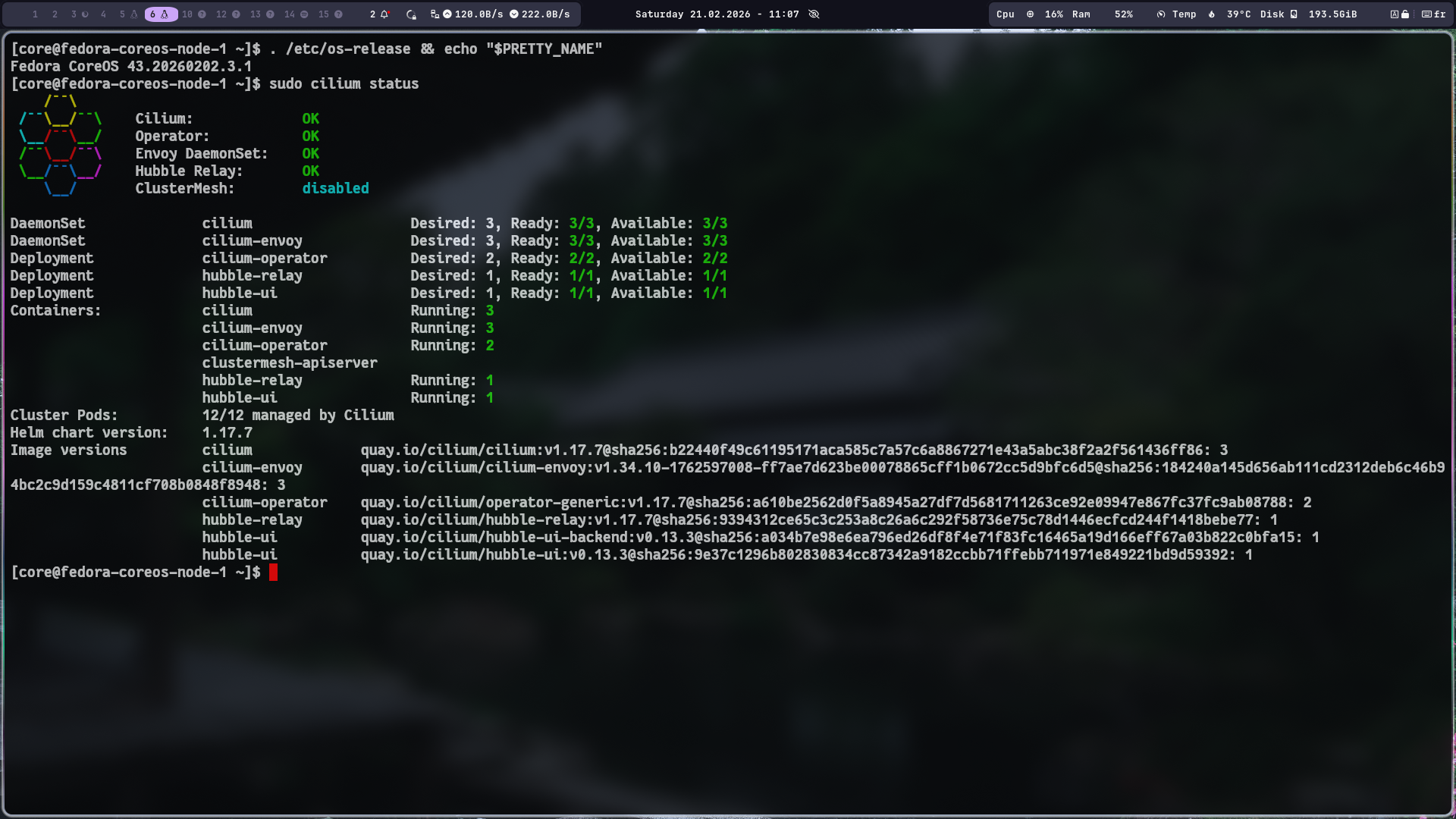
You can now either create a new cluster or update your existing one by running kubespray’s ansible-playbook command and once it’s done you can see the status by running cilium status and cilium connectivity test on one of the hosts
5. k8s provisioning with talos
We could have skipped all of the pain above by running Talos linux instead which is a read only file system based OS that brings a lot of the same benefits as fedora core OS. The main.tf would look something like this instead:
1
2
3
4
5
6
7
8
9
10
11
12
13
14
15
16
17
18
19
20
21
22
23
24
25
26
27
28
29
30
31
32
33
34
35
36
37
38
39
40
41
42
43
44
45
46
47
48
49
50
51
52
53
54
55
56
57
58
59
60
61
62
63
64
65
66
67
68
69
70
71
72
73
74
75
76
77
78
79
80
81
82
83
84
85
86
87
88
89
90
91
92
93
94
95
96
97
98
99
100
101
102
103
104
105
106
107
108
109
110
111
112
113
114
115
116
117
118
119
120
121
122
123
124
125
126
127
128
129
130
131
132
133
134
135
136
137
138
139
140
141
142
143
144
145
146
147
148
149
150
151
152
153
154
155
156
157
158
159
160
161
162
163
164
165
166
167
168
169
170
171
172
173
174
175
176
177
178
179
180
181
182
183
184
185
186
187
188
189
190
191
192
193
194
195
196
197
198
199
200
201
202
203
204
205
206
207
208
209
210
211
212
213
214
215
216
217
218
219
220
221
222
223
224
225
226
227
228
229
230
231
232
233
234
235
236
237
238
239
240
241
242
243
244
245
246
247
248
249
250
251
252
253
254
255
256
257
258
259
260
261
262
263
264
265
266
267
268
269
270
271
272
273
274
275
276
277
278
279
280
281
282
283
284
285
286
287
288
289
290
291
292
293
294
295
296
297
298
299
300
301
302
terraform {
  required_version = ">= 1.6.0"

  required_providers {
    hcloud = {
      source  = "hetznercloud/hcloud"
      version = "1.60.1"
    }

    talos = {
      source  = "siderolabs/talos"
      version = "0.10.1"
    }
  }
}

############################
# Providers
############################

provider "hcloud" {
  token = var.hcloud_token
}

############################
# Talos Secrets
############################

resource "talos_machine_secrets" "this" {}

############################
# Variables
############################

variable "image_id" {
  description = "Talos snapshot ID from Hetzner"
  type        = string
}

variable "ssh_key_fingerprint" {
  description = "Fingerprint of SSH key in Hetzner Cloud"
  type        = string
}

variable "hcloud_token" {
  type      = string
  sensitive = true
}

variable "cluster_name" {
  type    = string
  default = "talos"
}

variable "region" {
  type    = string
  default = "eu-central"
}

variable "location" {
  default = "hel1"
}

variable "server_type" {
  type    = string
  default = "cx23"
}

variable "talos_version" {
  type    = string
  default = "v1.12.4"
}

variable "node_count" {
  description = "Number of cluster nodes"
  type        = number
  default     = 3
}

# released: 2026-02-10
variable "kubernetes_version" {
  type    = string
  default = "1.35.1"
}

variable "admin_ip" {
  description = "Admin IPs in CIDR notation"
  type        = list(string)
  default     = []
}

############################
# Networking
############################
resource "hcloud_network" "k8s" {
  name     = "${var.cluster_name}-net"
  ip_range = "10.2.0.0/16"
}

resource "hcloud_network_subnet" "k8s_subnet" {
  network_id   = hcloud_network.k8s.id
  type         = "cloud"
  network_zone = var.region
  ip_range     = "10.2.0.0/24"
}

############################
# Firewall
############################
resource "hcloud_firewall" "k8s" {
  name = "${var.cluster_name}-fw"

  # Allow 6443 only from the load balancer's private network range
  # Blocks all direct public access to the apiserver
  rule {
    direction  = "in"
    protocol   = "tcp"
    port       = "6443"
    source_ips = var.admin_ip
  }

  # Allow Talos apid (required for talosctl)
  rule {
    direction  = "in"
    protocol   = "tcp"
    port       = "50000"
    source_ips = var.admin_ip
  }

  # Allow internal cluster traffic
  rule {
    direction  = "in"
    protocol   = "tcp"
    port       = "any"
    source_ips = ["10.2.0.0/24"]
  }

  rule {
    direction  = "in"
    protocol   = "udp"
    port       = "any"
    source_ips = ["10.2.0.0/24"]
  }

  # ICMP (ping)
  rule {
    direction  = "in"
    protocol   = "icmp"
    source_ips = ["0.0.0.0/0", "::/0"]
  }
}

resource "hcloud_firewall_attachment" "k8s" {
  firewall_id = hcloud_firewall.k8s.id
  server_ids  = hcloud_server.controlplane[*].id
}

############################
# Load Balancer
############################
resource "hcloud_load_balancer" "api" {
  name               = "${var.cluster_name}-api"
  load_balancer_type = "lb11"
  location           = var.location
}

resource "hcloud_load_balancer_network" "api_net" {
  load_balancer_id = hcloud_load_balancer.api.id
  network_id       = hcloud_network.k8s.id
}

resource "hcloud_load_balancer_target" "api_targets" {
  count            = var.node_count
  type             = "server"
  load_balancer_id = hcloud_load_balancer.api.id
  server_id        = hcloud_server.controlplane[count.index].id
  use_private_ip   = true  # target nodes via private IP, not public
}

resource "hcloud_load_balancer_service" "api_service" {
  load_balancer_id = hcloud_load_balancer.api.id
  protocol         = "tcp"
  listen_port      = 6443
  destination_port = 6443

  health_check {
    protocol = "tcp"
    port     = 6443
    interval = 15
    timeout  = 10
    retries  = 3
  }
}

############################
# Apply Config to Nodes
############################
resource "talos_machine_configuration_apply" "controlplane" {
  count                       = var.node_count
  client_configuration        = talos_machine_secrets.this.client_configuration
  machine_configuration_input = data.talos_machine_configuration.controlplane[count.index].machine_configuration
  node                        = hcloud_server.controlplane[count.index].ipv4_address
  depends_on                  = [hcloud_server.controlplane]
}

############################
# Bootstrap (only first node)
############################
resource "talos_machine_bootstrap" "bootstrap" {
  node                 = hcloud_server.controlplane[0].ipv4_address
  client_configuration = talos_machine_secrets.this.client_configuration
  depends_on           = [talos_machine_configuration_apply.controlplane]
}

############################
# Talos Controlplane Config
############################

data "hcloud_ssh_key" "default" {
  fingerprint = var.ssh_key_fingerprint
}

data "talos_machine_configuration" "controlplane" {
  count            = var.node_count
  cluster_name     = var.cluster_name
  cluster_endpoint = "https://${hcloud_load_balancer.api.ipv4}:6443"
  machine_type     = "controlplane"
  machine_secrets  = talos_machine_secrets.this.machine_secrets
  talos_version    = var.talos_version
  kubernetes_version = var.kubernetes_version

  config_patches = [
    yamlencode({
      cluster = {
        network = {
          cni = {
            name = "none"
          }
        }
        proxy = {
          disabled = true
        }
        allowSchedulingOnControlPlanes = true
      }
    })
  ]
}

############################
# Retrieve Kubeconfig
############################
resource "talos_cluster_kubeconfig" "kubeconfig" {
  node                 = hcloud_server.controlplane[0].ipv4_address
  client_configuration = talos_machine_secrets.this.client_configuration
  depends_on           = [talos_machine_bootstrap.bootstrap]
}

############################
# Control Plane Nodes
############################

locals {
  controlplane_ips = [
    "10.2.0.11",
    "10.2.0.12",
    "10.2.0.13"
  ]
}

output "api_endpoint" {
  value = hcloud_load_balancer.api.ipv4
}

output "kubeconfig" {
  value     = talos_cluster_kubeconfig.kubeconfig.kubeconfig_raw
  sensitive = true
}

output "talosconfig" {
  value     = talos_machine_secrets.this.client_configuration
  sensitive = true
}

output "cp0_config" {
  value     = data.talos_machine_configuration.controlplane[0].machine_configuration
  sensitive = true
}

output "ssh_key_info" {
  value = {
    name        = data.hcloud_ssh_key.default.name
    fingerprint = data.hcloud_ssh_key.default.fingerprint
  }
}

output "controlplane_ips" {
  value = hcloud_server.controlplane[*].ipv4_address
}

output "load_balancer_ip" {
  value = hcloud_load_balancer.api.ipv4
}
Conclusion
What was supposed to be a quick plug in replacement and simple upgrade turned out to be a week-long project which just reminds us that estimating user stories or planning in general is extremely hard in IT. Unless you have done it before and can estimate the effort based on past experience, an estimate will just be anyone’s guess, and whoever tells you otherwise probably never worked in IT.
In the next episode I’ll focus on hubble, policies and actual monitoring. I’m wondering if those metrics can be fed into an open telemetry endpoint or into a time database like prometheus.
See you on the next one
Cheers